Tobii 4C: recovering head pitch from the face, on a webcam for now
With only two eyes, the head's "yes" cannot be seen. I describe how I recovered the pitch from the 478 face points of MediaPipe Face Landmarker with a prototype on a USB webcam, while waiting to bring it to the Tobii 4C's infrared images, and what I do not know yet.
In the previous entry I left a problem open. The Tobii Eye Tracker 4C does not send the head pose. From the two corneal centres, that is, the position in space of the two eyes, one can derive the position of the head, the yaw (the “no”) and the roll (the head tilted towards a shoulder). The pitch (the “yes”), however, is not observable: the rotation happens around an axis that passes almost through the two eyes, and the two points stay practically still.
In this entry I describe how I tackled the problem with a prototype, written with the help of the AI assistant I mentioned: a test program that recovers the pitch from the face rather than from the eyes alone. For now it works on the images of a USB webcam, not on those of the 4C. Bringing it to the sensor’s infrared (IR) images is the next step.
There are no accuracy measurements: there is a method, a screenshot and an honest list of doubts.
The idea: a face has many more points than two eyes
If two points are not enough, we need other points that do not lie on the axis of the “yes”. The tip of the nose, the chin and the forehead are perfect. When you nod, the tip of the nose, which sticks out forward, moves up or down relative to the eyes. That is exactly the missing information.
To find these points in the images I use MediaPipe Face Landmarker, a set of Google models for
face analysis. The official bundle contains three: a face detector (BlazeFace), a face landmark
model and a facial expression model (Google AI Edge, n.d.). The prototype uses
only one of them, the face_landmarks_detector network.
This network receives a square 256 × 256 pixel crop of the face and returns:
- 478 3D points: 468 form a mesh covering the face, 10 describe the irises, 5 per eye, that is, the centre and four points on the edge (Yan and Grishchenko, 2022; Ablavatski et al., 2020, preprint);
- a probability that the crop really contains a face.
Each point has two coordinates in pixels and a third one, z, which is a relative depth: it says whether a point lies further forward or back relative to the centre of the face, not how many millimetres it is from the camera (Yan and Grishchenko, 2022). The model derives from Google’s work on estimating face geometry with a single camera (Kartynnik et al., 2019, preprint).
The network is released under the Apache 2.0 licence (Yan and Grishchenko, 2022). In the prototype I use a conversion to the ONNX format made by a third party, which states that the weights were not modified (senty-au, n.d.). The file is 4.9 MB, it is embedded in the program, and the program checks its SHA-256 fingerprint.
An interpreter written from scratch
To run a neural network one usually relies on a library such as TensorFlow or ONNX Runtime. In the prototype I made a different choice: a small interpreter written in Go that reads the model file and can execute only the operations this network needs (convolutions, additions, activation functions, changes in the shape of the data).
This is consistent with the goals I set in the previous entry: no proprietary components, few dependencies, memory prepared at start-up and reused. The interpreter uses the AVX2 and FMA vector instructions of recent processors when they are available; otherwise it falls back to plain Go code.
One inference costs 113 million multiply-accumulate operations (MACs), that is, operations of the kind “multiply two numbers and add the result to a running total”.
Finding the face and cropping it
The network does not search for the face in the whole image. It expects a crop with the face in the centre, a margin around it and the line of the eyes horizontal; it tolerates only small errors in position and rotation (Yan and Grishchenko, 2022). The real work, then, is preparing the right crop. The prototype has two ways:
- Tracking. If there was a face shortly before (within 1.5 seconds), the new crop is derived from its points: centred on the face, 1.5 times larger, and rotated so that the line between the outer corners of the eyes is horizontal. One inference is enough.
- Grid search. Otherwise the program tries crops of three sizes (60 %, 40 % and 85 % of the short side of the image) on a grid with a step of half a side, from the centre towards the edges. It stops at the first crop with a probability above 0.95, then refines the result with tracking. It costs up to about thirty inferences.
The bundle’s BlazeFace detector is not used: to find the face, the probability returned by the landmark network itself is enough. To avoid wasting computation, if the grid search finds nothing it is repeated less and less often, down to once every 2 seconds.
Before passing the crop to the network, the program normalises the contrast: it stretches the grey levels between the 1st and the 99th percentile of the crop. This choice is designed for IR images, which are dark and change with automatic exposure, whereas the model was trained on well-exposed colour photos. The image is black and white, so the same grey value is copied into the three colour channels the network expects.
From points to angles: fitting a mask onto the face
Once the points are found, we need to work out how the head is oriented. Here the prototype follows
the same path as MediaPipe’s face_geometry module (The MediaPipe Authors, 2020).
The idea is easy to picture. Imagine a rigid mask, an average face in 3D, that you have to lay onto the face seen by the camera, rotating, moving and scaling it until its points match the ones found by the network as closely as possible. The rotation needed to make it fit is the rotation of the head.
The mask is MediaPipe’s canonical face model. The prototype uses 33 of its points, the most rigid ones: points of the nose, cheekbones, eye corners and forehead. Each has a weight, also taken from MediaPipe (Apache 2.0).
The method for finding the rotation that best overlays two sets of points is called Procrustes analysis. The prototype uses Horn’s closed-form solution based on quaternions (Horn, 1987). The computation proceeds in three steps:
- Scale. A first comparison between the mask, in millimetres, and the points, in pixels, tells how many pixels one millimetre of the face is worth. From this, using the camera’s focal length, the distance is estimated. An example: if one millimetre of the face spans 0.8 pixels and the focal length is 554 pixels, the face is at about 554 / 0.8 ≈ 690 mm.
- Points in 3D. Each point is placed back in space along the camera ray that passes through it, at that distance plus its relative depth.
- Rotation. A second Procrustes fit, now between 3D points in millimetres, gives the rotation. If the resulting scale is not 1, the distance used was wrong: the program corrects it and repeats steps 2 and 3, three times in total.
Note that this is not the classic PnP (Perspective-n-Point) method, which looks for the pose by comparing the 3D points of a model with their pixels in the image. Here 3D points are aligned with 3D points, as in MediaPipe.
The final rotation is decomposed into three angles, in the order yaw, pitch, roll. The pitch is the elevation of the direction the face is pointing: positive upwards. The names of the angles are those of the previous entry (Murphy-Chutorian and Trivedi, 2009).
The test bench: the webcam
The prototype is called “Face from the webcam”. It reads the images directly through Linux’s video subsystem (V4L2), without C libraries, and shows full screen the image with the face points and all the current measurements.
For the tests I used a high-resolution USB webcam, read here at 640 × 480: the screenshot below does not come from the Tobii 4C.
The image is black and white: the program takes only the luminance, as it comes from the webcam, and works on single-channel images. This is deliberate, to get closer to the sensor’s IR images, which are also greyscale.
There is an important difference. The webcam is not calibrated: the angles are computed relative to the webcam’s axis, with a focal length assumed from the horizontal field of view, 60° by default. For an image 640 pixels wide the focal length is 320 / tan(30°) ≈ 554 pixels. Without calibration the focal length is an assumption: the angles depend on it only slightly, the distances proportionally.
The program also computes a few additional measures:
- distance from the iris. The horizontal diameter of the iris is nearly the same across a wide population, 11.7 ± 0.5 mm (Vakunov and Lagun, 2020). Knowing its diameter in pixels and the focal length, the distance can be derived. The program uses the less foreshortened iris;
- EAR (eye aspect ratio), the ratio between the height and the width of the eye computed from six points on the eyelids and eye corners (Soukupová and Čech, 2016). It is almost constant while the eye is open and drops towards zero when the eye closes;
- blinks. The program considers the eye closed when the average EAR of the two eyes drops below 70 % of its typical value over the last 5 seconds, and open again above 80 %. A closure counts as a blink if it lasts at most 700 ms. Soukupová and Čech instead use a classifier over a window of frames: the program’s adaptive threshold is a simpler choice;
- MAR (mouth aspect ratio), defined in the program as the inner opening of the lips divided by the inner width of the mouth.
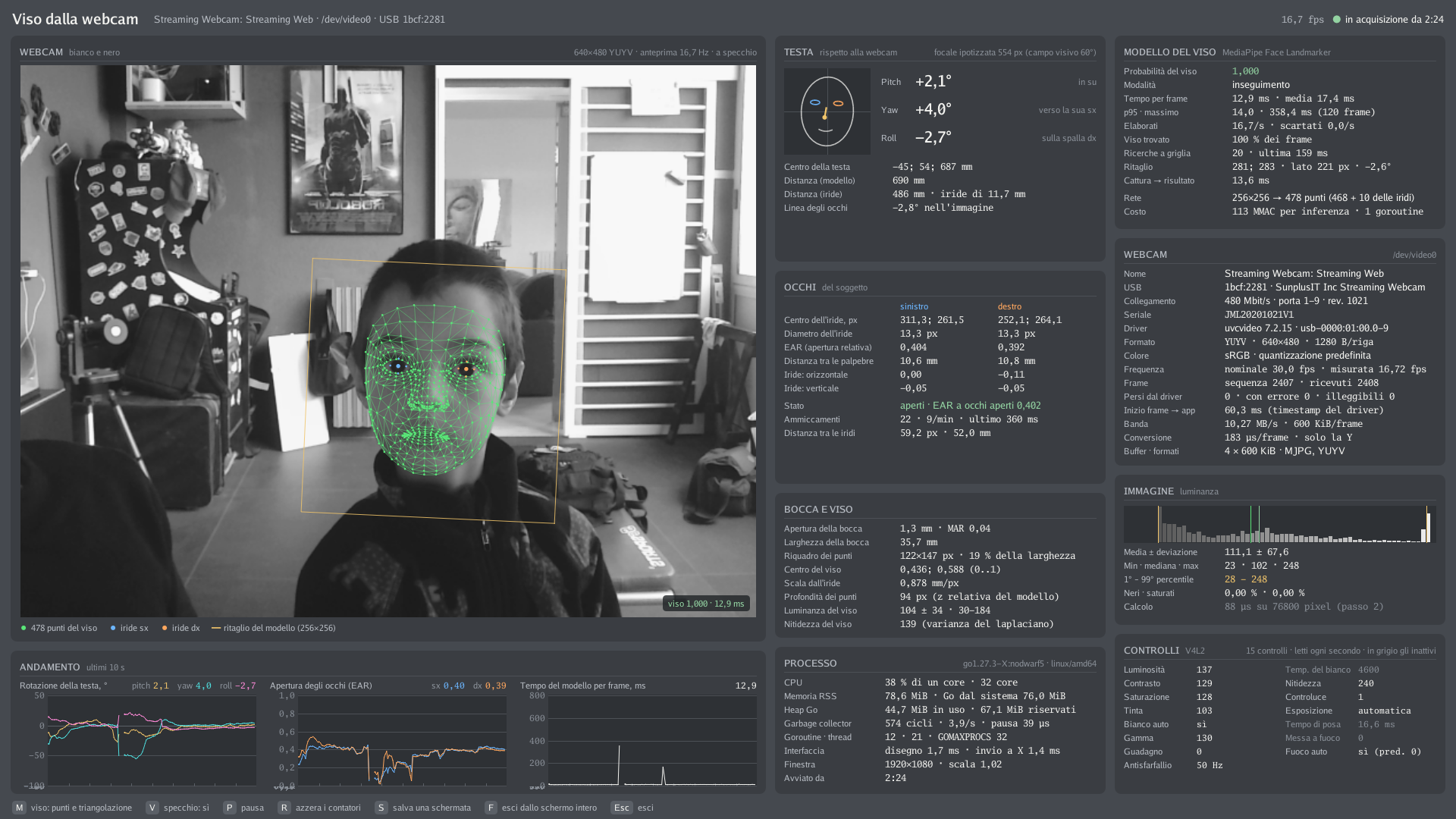
How to read the screenshot
The screenshot shows one instant, with one person. The numbers help to understand what the interface displays, not to measure accuracy.
| Panel | Values at this instant |
|---|---|
| Webcam | 640 × 480 YUYV, 16.7 frames per second measured (30 nominal) |
| Head | pitch +2.1°, yaw +4.0°, roll −2.7°; assumed focal length 554 px (60° field of view) |
| Distances | 690 mm from the canonical model, 486 mm from the iris (11.7 mm iris) |
| Eyes | EAR 0.404 (left) and 0.392 (right); 22 blinks, 9 per minute |
| Face model | 12.9 ms per frame, mean 17.4 ms, p95 14.0 ms, maximum 358.4 ms; 256 × 256 → 478 points; 113 MMAC per inference |
| Process | 38 % of one core |
Two details deserve an explanation.
The mean is higher than the 95th percentile. It looks odd, but it is not. The time per frame is computed over the last 120 frames, and these include grid searches, which are much slower than a normal inference (the maximum is 358.4 ms). A few very high values shift the mean but not the percentile.
The webcam runs at 16.7 frames per second instead of 30. I have seen that in a dimly lit room this webcam drops by itself to about 17 frames per second, because of automatic exposure.
The same interface in motion
A still screenshot cannot show the most important thing: pitch changing as the head moves. In the video, about 19 seconds of the same interface, a person nods, turns the head right and left, opens the mouth and closes the eyes. In the Head panel and in the rotation plot at the bottom left you can see pitch rise and fall with the “yes”, separate from the yaw of the “no”. Here too the numbers are those of the moment, not accuracy measurements.
Two distances that do not add up
The most striking difference is between the two distances: 690 mm from the canonical model and 486 mm from the iris. The way they are computed explains part of the difference, not all of it.
- They do not measure the same point. The “model” distance is that of the canonical model’s origin, which lies behind the root of the nose. In the canonical model the eye corners are about 3–4 cm in front of that origin. A few centimetres of difference are therefore expected.
- They use two different rulers. The model distance assumes that the face has the size of MediaPipe’s average face: if the face is larger or smaller, only the estimated distance changes, not the angles. The iris distance assumes an 11.7 mm iris.
- The focal length alone cannot explain it. Given how the formulas are written, both distances grow in proportion to the assumed focal length, so an error in the focal length would change both by the same ratio.
About 16–17 cm remain that I cannot explain. Nor do I know which of the two is closer to the truth: at that moment I did not measure the real distance. It is an open question.
The next step: bringing it to the 4C
In the previous entry I wrote that the next step would be writing a free driver for GNU/Linux. The webcam prototype is meant to prepare that work: when the 4C gives me its infrared images, the method will have to work there too. Some things, however, are not present on the webcam and will have to be added.
- The 4C’s camera will have to be calibrated. On the webcam the focal length is an assumption. To get reliable angles and distances on the sensor, its camera will need to be actually known.
- The angles will have to be referred to the screen. On the webcam they are relative to the camera’s axis. For Kite, what matters is how the head is turned relative to the screen.
- The pitch will have to be filtered. I plan to use a 1 € filter (one euro filter), which smooths out the small fluctuations in the measurement (Casiez et al., 2012). The name is the authors’ pun: the filter is so simple and cheap to compute that it “costs” one euro; it has nothing to do with money. The filter adapts its strength to the speed of the head: when the head is still it smooths a lot and removes the jitter, when the head moves quickly it smooths little, so the value does not lag behind the movement. For now, the webcam prototype shows the values without filtering.
The open problem: a model for colour photos on infrared images
In the previous entry I wrote that I did not know whether a model trained on colour images would work on the 4C’s IR images. The doubt remains. The model card reinforces it: the network is optimised for videos captured with the front camera of smartphones, and the training data were collected with smartphone cameras (Yan and Grishchenko, 2022). The 4C’s images are infrared, dark, and taken from close up and from below.
Here is what I can say, honestly:
- What I did: the prototype works in greyscale, normalises the contrast of each crop and copies the grey value into the three channels. I did not retrain the network.
- What I observed: on the webcam, in black and white, the network finds the face. In the screenshot the model panel reports the face found in 100 % of the frames and the tracking mode, that is, the face followed from one frame to the next without new searches.
- What I do not know: whether the network will work on the 4C’s IR images, and with what precision; how it behaves with other people, with glasses, with other skin tones, at different distances or with different room lighting. I have no measurements on this.
Open problems
- Pitch accuracy. I have not measured it yet. A comparison with an independent reference is needed.
- A single person. The tests so far have been done with one face.
- The two distances from the webcam, 690 mm versus 486 mm, still without a full explanation.
- The cost. At the instant of the screenshot the program uses 38 % of one core. I will need to find out how much it will cost on the computer that runs Kite, and how many inferences per second are really needed.
- Eye opening. In the previous entry I wondered whether the 4C provides it directly. The EAR computed from the face points could be an alternative, but so far I have only seen it on the webcam.
Next steps
- Measure the pitch against a reference, for example at known head tilts.
- Measure the real distance in front of the webcam, to find out which of the two estimates is wrong and why.
- Try the prototype with other people, with their informed consent.
- Bring the method to the 4C’s IR images, together with the free driver, and check whether the network works on those images.
- Assess whether the EAR is reliable enough for a voluntary blink used as a click in Kite.
Warning. Kite is an experimental project and is not a certified medical device. The head pose estimation described here does not yet have a measured accuracy, and Google’s model card states that the network is not intended for human life-critical decisions. When I work on the 4C with an unofficial driver, I will be using the tracker in ways not foreseen by the manufacturer: sending commands whose effect is unknown could change its behaviour, including that of the infrared illuminators. Anyone who depends on an AAC tool to communicate should always have a backup alternative. Tests with people require informed consent and, when needed, the approval of an ethics committee; images of the face are personal data.
References
- Ablavatski A., Vakunov A., Grishchenko I., Raveendran K., Zhdanovich M. (2020). Real-time pupil tracking from monocular video for digital puppetry. arXiv (preprint). arXiv:2006.11341
- Casiez G., Roussel N., Vogel D. (2012). 1 € filter: a simple speed-based low-pass filter for noisy input in interactive systems. Proceedings of the SIGCHI Conference on Human Factors in Computing Systems (CHI ‘12), 2527–2530. doi:10.1145/2207676.2208639
- Google AI Edge (n.d.). MediaPipe Face Landmarker. Official technical documentation. developers.google.com
- Horn B. K. P. (1987). Closed-form solution of absolute orientation using unit quaternions. Journal of the Optical Society of America A, 4(4), 629–642. doi:10.1364/JOSAA.4.000629
- Kartynnik Y., Ablavatski A., Grishchenko I., Grundmann M. (2019). Real-time facial surface geometry from monocular video on mobile GPUs. arXiv (preprint). arXiv:1907.06724
- Murphy-Chutorian E., Trivedi M. M. (2009). Head pose estimation in computer vision: a survey. IEEE Transactions on Pattern Analysis and Machine Intelligence, 31(4), 607–626. doi:10.1109/TPAMI.2008.106
- senty-au (n.d.). face_landmarks_detector-ONNX [unofficial ONNX conversion of MediaPipe’s
face_landmarks_detectornetwork]. Hugging Face. huggingface.co/senty-au/face_landmarks_detector-ONNX - Soukupová T., Čech J. (2016). Real-time eye blink detection using facial landmarks. 21st Computer Vision Winter Workshop (CVWW 2016), Rimske Toplice, Slovenia. PDF
- The MediaPipe Authors (2020). face_geometry module: canonical face model and Procrustes basis
(
geometry_pipeline_metadata_landmarks.pbtxt), Apache 2.0 licence. GitHub, google-ai-edge/mediapipe. github.com/google-ai-edge/mediapipe - Vakunov A., Lagun D. (2020, 6 August). MediaPipe Iris: real-time iris tracking & depth estimation. Google Research Blog. research.google
- Yan G., Grishchenko I. (2022). Model card: MediaPipe FaceMesh (15 September 2022). Google, Apache 2.0 licence. PDF