Kite: how typing worked with gaze and a 1-second dwell time
An account of the first way of typing in Kite, using eye position to choose a key and 1 s of steady gaze to press it. What worked and what its limitations were.
Part of Kite, my open Augmentative and Alternative Communication (AAC) tool, is a virtual keyboard operated with the eyes. In this entry I describe how the first version worked, the one I implemented at the start.
It was based on dwell time: you look at a key and keep your gaze on it for 1 second, until the key “presses” itself. This is the old approach I implemented in Kite: I am now studying a new mechanism, based on other factors, to make typing faster and the keyboard more usable.
Typing with the eyes, in brief
An eye tracker is a small bar with cameras and infrared illuminators mounted below the screen. At every moment it estimates the point on the screen the person is looking at.
For people who cannot move their hands but still control their eyes, this point can act as a pointer. The literature calls this technique eye typing or gaze typing. It has been studied for a long time: already in 2002 a review traced twenty years of systems and design issues (Majaranta and Räihä, 2002).
One clarification: an eye tracker is not a Brain Computer Interface (BCI). A BCI reads brain activity, as I explain in the entry on BCIs. An eye tracker instead observes eye movement, which depends on the eye muscles. Many people with severe motor disabilities retain precisely this movement, which is why gaze is one of the most widely used channels in AAC.
The “Midas Touch” problem
Pointing with the eyes is easy. The hard part is clicking. With a mouse you point and then press a button; with gaze there is no button, because the eyes are also, and above all, used for looking.
If the system pressed every key the gaze landed on, every glance would become a command. Robert Jacob called this the “Midas Touch” problem, after King Midas: everywhere you look you activate something, and you cannot look around without issuing a command (Jacob, 1991).
Dwell time is the most common solution. When we look at something, the eyes stop on a point for a short time, called a fixation, which usually lasts between 200 and 600 ms (Majaranta et al., 2006). If the system requires a steady gaze much longer than a normal fixation, it can tell “I am reading” apart from “I want to press”. According to the same source, 1000 ms is usually enough to prevent unintended selections.
How Kite’s old keyboard worked
To describe the old keyboard accurately I rely on the code of a Linux program in which I reimplemented it. Everything below describes this reimplementation.
Where the gaze comes from
The tracker is a Tobii Eye Tracker 4C, read by a Linux driver of mine at 90 samples per second (90 Hz). Each sample contains the gaze point in screen coordinates.
The keyboard uses the gaze point provided by the Tobii 4C. It does not distinguish saccades from fixations: it only checks which key the point falls on, sample after sample.
From gaze to key
The mapping is purely geometric. Each key is a fixed rectangle on the screen, and the candidate key is the one containing the gaze point. There is no prediction of the next letter: all keys are treated the same way.
Between keys there is a small empty gap, equal to 8% of the key size. A gaze point falling in this gap, or in the empty areas at the sides of the rows, belongs to no key.
The 1-second timer
Sample by sample, the mechanism works like this:
- When the gaze enters a key, that key becomes the candidate and the count starts from zero.
- As long as the gaze stays on the candidate, the count grows. At each sample the time elapsed since the previous one is added, capped at 50 ms, so a gap in the data does not make the timer jump forward.
- When the count reaches 1 s, the key is activated and the letter enters the text.
- If the gaze leaves the key for no more than 100 ms, the count is paused but not reset. This tolerates the jitter of the point near the edges.
- If the gaze stays outside longer, the count is reset and the key being looked at becomes the candidate.
- If the tracker loses the eyes, for example during a blink, the count is paused for up to 300 ms. Beyond that threshold it is reset.
- After an activation the count restarts from zero. Staying on the same key, the letter repeats after another full second.
In the program the dwell duration is a parameter; in the old keyboard it is 1 s.
Visual feedback
While a key is being fixated, a faint ring appears around the letter. On top of the ring a coloured arc fills clockwise, starting from the top, in proportion to the time already elapsed: when the arc closes, the key is pressed. It is the same principle as the closing circle used in a reference study on dwell time (Majaranta et al., 2009).
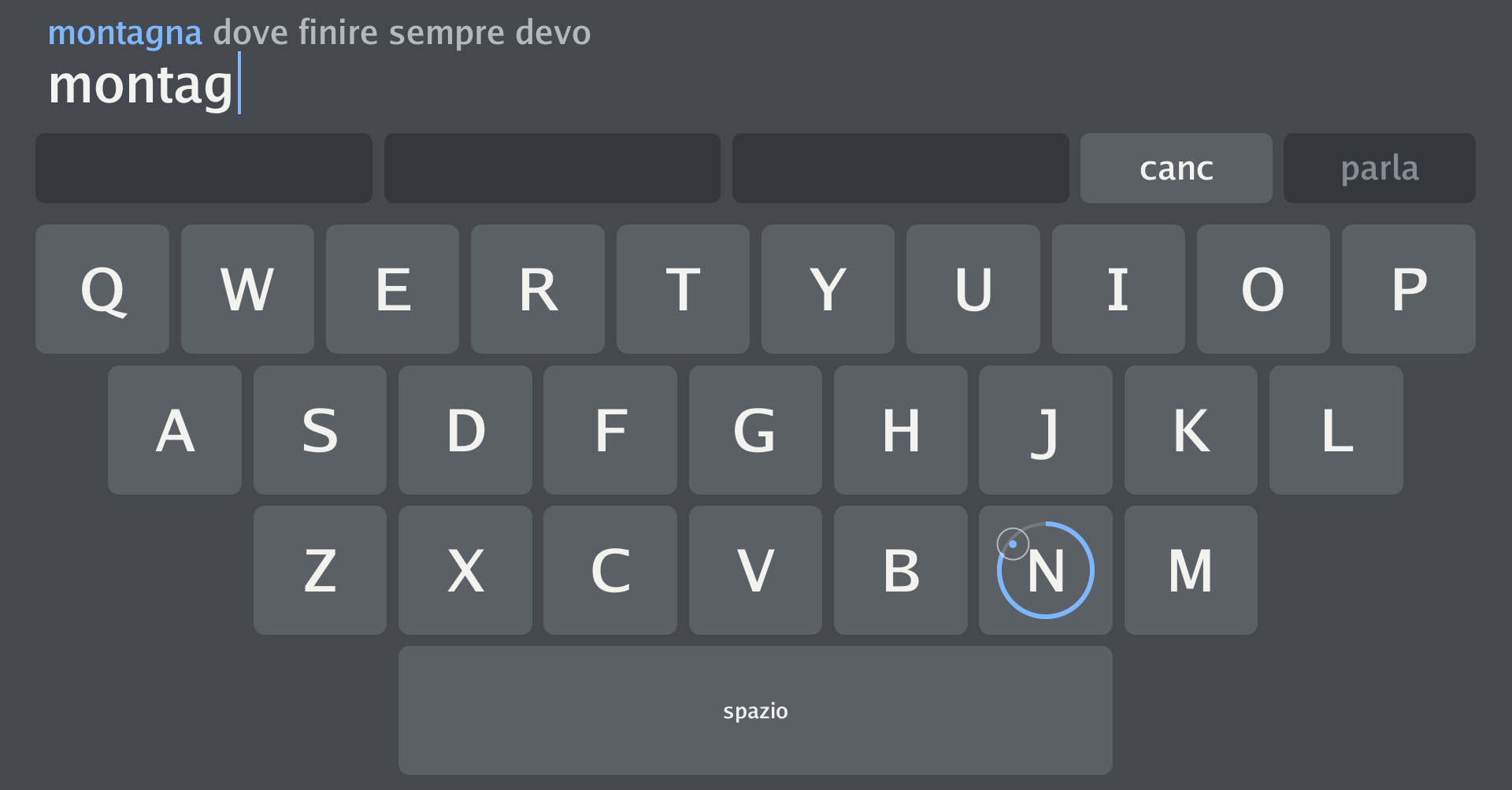
Kite’s old keyboard while I type “montagna” (Italian for “mountain”): on the N key the blue dwell-time arc is almost closed; the small circle is the gaze point.
When a selection happens, the key flashes for 350 ms. In copy exercises, where the program knows the phrase to be typed, the flash is green if the letter is right and red if it is wrong.
Key layout
The keyboard is an on-screen QWERTY with 27 keys:
| Row | Keys | Offset from the left edge |
|---|---|---|
| 1 | Q W E R T Y U I O P | none |
| 2 | A S D F G H J K L | half a key |
| 3 | Z X C V B N M | one and a half keys |
| 4 | space bar, 5 keys wide, below X…N | two and a half keys |
The keyboard spans almost the full width of the screen and roughly its lower two thirds. This makes every key large, which matters: small targets are hard to hit with the eyes. Above the keyboard there is a delete key (canc) to remove the last letter, pressed with the same 1 s dwell.
Letters are lower case only and there is no punctuation. The old keyboard has no autocorrect and no word suggestions. The program also offers an alternative alphabetical layout, on a grid of 3 rows of 9 keys.
What worked
- Gaze alone is enough. Dwell time does not require blinking or pressing a switch. For people with very severe motor disabilities, such as in the advanced stages of amyotrophic lateral sclerosis (ALS), residual muscle control may not be sufficient for these alternatives. This is why dwell-based selection remains the standard interaction for many of them (Mott et al., 2017).
- It is easy to understand. “Look at the letter until the circle closes” can be explained in one sentence.
- It respects pauses. You can stop typing in the middle of a word to think or to look at the person you are talking to: you just move your gaze off the keyboard. Not all faster methods allow this (Mott et al., 2017).
- One second is cautious. With 1 s, unintended selections become rare, because it is much longer than a normal fixation (Majaranta et al., 2006).
Limitations
A ceiling on speed
The first limitation is mathematical. With a 1 s dwell you cannot press more than 60 keys per minute, however skilled you become. In text entry one word is usually counted as 5 characters, spaces included. The theoretical ceiling is therefore 12 words per minute (WPM) (Majaranta et al., 2006).
In practice typing is slower, because you also have to search for the letter and correct errors. Studies with a fixed dwell time, typically between 450 and 1000 ms, report speeds of about 5–10 WPM (Majaranta et al., 2009). For comparison, typing on a regular keyboard reaches 40–60 WPM (Mott et al., 2017).
The speed–error trade-off
Shortening the dwell makes typing faster, but increases the risk of pressing a key just because you were looking at it. Lengthening it protects against errors, but slows everything down. It is a trade-off that designers and users have to negotiate (Mott et al., 2017).
A fixed dwell makes this choice once and for all, for every key and every person. But people get faster with practice. In a longitudinal study, 11 university students without disabilities, all novices at gaze typing, could adjust the dwell themselves, starting from 1000 ms. Over 10 sessions of 15 minutes, analysed on 10 participants, the mean dwell dropped from 876 to 282 ms. Speed rose from 6.9 to 19.9 WPM and the error rate left in the text fell from 1.28% to 0.36% (Majaranta et al., 2009). These results were obtained with other participants, another tracker and another language: they say nothing measured on Kite. They do suggest, however, that a fixed 1 s dwell can become a brake precisely for people who are learning.
Search errors
Dwell does not fully eliminate the Midas Touch, it shifts it. If I stop to search for a letter, or to think about the next word, with my gaze resting on a key for one second, that key gets pressed. The same applies to the eye that stays still after a selection: the letter is repeated.
Double letters cost double
In the old keyboard’s code, repeating a letter takes another full second. To type “passare” (Italian for “to pass”) you have to stay 2 s on the S, or leave the key and come back.
Fatigue
Keeping the gaze still for a long time is tiring. A prolonged fixation prevents wrong selections, but is uncomfortable for most people (Majaranta et al., 2006). In the same work, after four sessions with a 900 ms dwell, all participants considered it too long, even though it had seemed appropriate at the start. They reported that it tired their eyes and made it hard to concentrate.
Tracker accuracy
The measured gaze point never coincides exactly with the real one. Because of how the eye works and the limits of the camera, the accuracy of a remote tracker is about 0.5° of visual angle. With use, the measured point also tends to move away from the real one (drift). In practice the error reaches 0.5–1°, that is 1–1.5 cm on the screen at a normal viewing distance (Majaranta et al., 2006). This is why keys must be large, and why Kite’s old keyboard fills most of the screen.
What I learned
A fixed 1 s dwell is a solid solution: it is robust, immediately understandable and works with eye movement alone. But it imposes a hard ceiling on speed, treats every key and every moment of typing the same way, and demands constant effort from the eyes.
For people who use AAC every day these limitations matter. In a conversation, waiting for a sentence typed at a few characters per minute often means missing the right moment to say it.
Disclaimer. Kite is an experimental project and is not a certified medical device. Anyone who depends on an AAC tool to communicate should always have a backup option, for example a paper alphabet board. Tests with people require informed consent and, where needed, approval from an ethics committee.
References
- Jacob R. J. K. (1991). The use of eye movements in human-computer interaction techniques: what you look at is what you get. ACM Transactions on Information Systems, 9(2), 152–169. doi:10.1145/123078.128728
- Majaranta P., Ahola U.-K., Špakov O. (2009). Fast gaze typing with an adjustable dwell time. In Proceedings of the SIGCHI Conference on Human Factors in Computing Systems (CHI ‘09), 357–360. ACM. doi:10.1145/1518701.1518758. Open access version
- Majaranta P., MacKenzie I. S., Aula A., Räihä K.-J. (2006). Effects of feedback and dwell time on eye typing speed and accuracy. Universal Access in the Information Society, 5(2), 199–208. doi:10.1007/s10209-006-0034-z. Open access version
- Majaranta P., Räihä K.-J. (2002). Twenty years of eye typing: systems and design issues. In Proceedings of the Symposium on Eye Tracking Research & Applications (ETRA ‘02), 15–22. ACM. doi:10.1145/507072.507076
- Mott M. E., Williams S., Wobbrock J. O., Morris M. R. (2017). Improving dwell-based gaze typing with dynamic, cascading dwell times. In Proceedings of the 2017 CHI Conference on Human Factors in Computing Systems (CHI ‘17), 2558–2570. ACM. doi:10.1145/3025453.3025517. Open access version